Introduction of parsing
 Szymon Czarnecki
 the-next-hop
All code from this series is also available on GitHub, link above!
In the previous article, we touched on the very basics of Nornir and its architecture. We were able to print the output of the show interfaces description command in a nice, presentable way using the print_result function in Nornir. This is great if you wish to run a query on one or just a few devices, but if you need to analyse the data from tens, hundreds, or even thousands of devices, you will get confused real quick. It is just not feasible.
What is parsing?
Parsing is a process of analyzing, breaking down and transforming raw, unstructured data into a structured, machine-readable format (such as JSON, CSV, YAML, XML - whatever you need). This also help us, humans, to be able to read the data in a more natural way. If you, let's say, obtain information about the devices in your network, such as software version, LLDP neighbours, ARP table or whatever it might be, it is way easier to transform it into a CSV format so that you can pass it on to more non-technical colleagues, who may struggle to read the original, unparsed data.
Introduction of TextFSM
What is TextFSM
TextFSM is a great, open-source tool developed by Google. It is designed to parse our unstructured data into structured data, as per the explanation above. There are other tools, such as TTP, but in this article, we will focus on TextFSM as it is the one I have the most exposure to.
TextFSM relies on what's called a TextFSM template. You will need to generate, or use an existing template that is specific to the data that you are parsing. This is where TextFSM is not very modular in my eyes, as all it takes is one simple change in the way the data is presented in the unstructured format (let's say Cisco decides to add a new line in the output), and the template breaks, as it is very rigorous with what it is expecting to parse. Luckily, in today's day and age, there are plenty of tools to help us fix it relatively quickly.
Templates
Thankfully, there is a huge library of textFSM templates available in courtesy of Network To Code, which has built a collection of templates for the most common commands and vendors.
 networktocode
This repository/library is also built in with Nornir, but in this article, I will show you how I tend to do it by adding the templates manually in the folder where the script is built.
TextFSM template example
Given what we have learned from the previous lesson, let's stick to show the interface description command for now.
I will not pretend that I write TextFSM templates from scratch. TextFSM relies on Regular Expressions (regex). I believe I can save time by utilising the tools available at our fingertips, with little to no effort! If the NTC-Templates repository does not have what I need, I paste the dummy console output into an LLM of my choice and let it handle the regex. Life is too short!
With the confession out of the way, let me show you what the template looks like for the command above.
Value INTERFACE (\S+)
Value STATUS (\S+)
Value PROTOCOL (\S+)
Value DESCRIPTION (.*)

Start
  ^Interface\s+Status\s+Protocol\s+Description -> Start
  ^${INTERFACE}\s+${STATUS}\s+${PROTOCOL}\s*${DESCRIPTION} -> Record
There are tools available to play with regex, such as regex101.com I have a very, very basic understanding of what the expressions are; I don't think it's fair for me to dive into it deeper than I already have.
How can I test the template before running it in the script?
There are a few websites online that allow you to paste your raw output (CLI) along with the desired textFSM template, which then produces the output. My personal go-to is textfsm.nornir.tech.
Let's take the output from our previous article (which I obtained by logging into the device and copied it in a raw format), parse it through the template above and see what it produces for us:
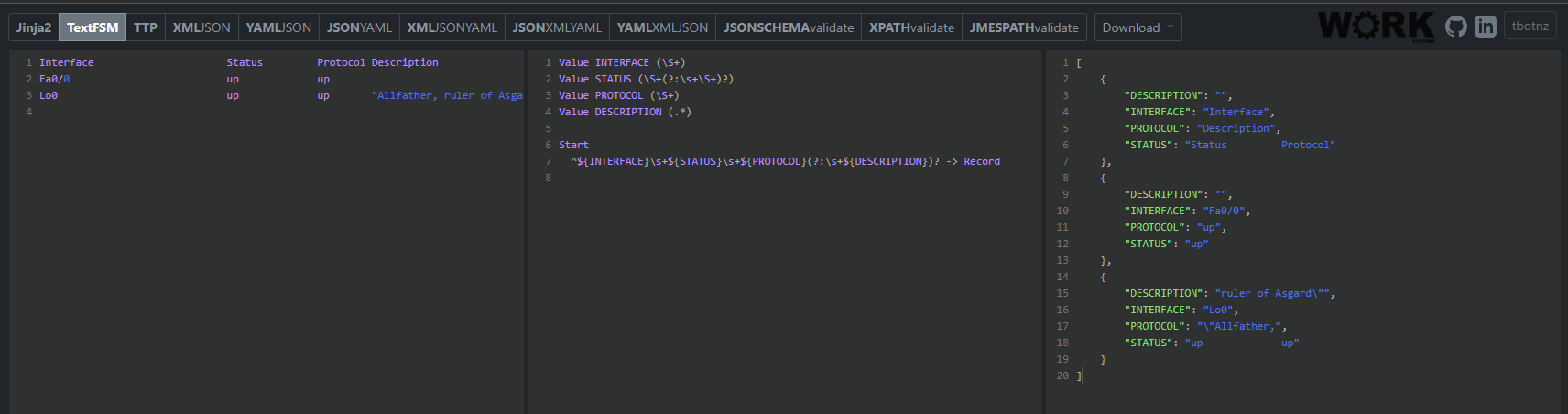
[
	{
		"DESCRIPTION": "",
		"INTERFACE": "Interface",
		"PROTOCOL": "Description",
		"STATUS": "Status         Protocol"
	},
	{
		"DESCRIPTION": "",
		"INTERFACE": "Fa0/0",
		"PROTOCOL": "up",
		"STATUS": "up"
	},
	{
		"DESCRIPTION": "",
		"INTERFACE": "Et1/0",
		"PROTOCOL": "down",
		"STATUS": "admin down"
	},
	{
		"DESCRIPTION": "ruler of Asgard\"",
		"INTERFACE": "Lo0",
		"PROTOCOL": "\"Allfather,",
		"STATUS": "up             up"
	}
]
Parsed output.
As you can see, the output is a list containing the set of dictionaries that contains the relevant information that we need to obtain. The beauty of this is that we can now easily obtain that data and parse it further, but how do we do this using our current script?
Script
Recap
Here is the recap of what our script looks like at the moment:
from nornir import InitNornir
from nornir_netmiko.tasks import netmiko_send_command
from nornir_utils.plugins.functions import print_result

nr = InitNornir(config_file="config.yaml")


get_interface = nr.run(
    task=netmiko_send_command,
    command_string="show interface description",
)

print_result(get_interface)
Adding TextFSM
Let's start by adding the TextFSM template to the existing method called get_interface. Later down the line, we will move it into its own, separate function so that it becomes easier to call multiple different functions in a sequence of our choice.
First, let's create a new folder called templates inside of our script and copy the generated TextFSM output into a text file, and we need to give it an extension of .textfsm.
nornir-series/
├── inventory/
│   ├── hosts.yaml
│   ├── groups.yaml
│   └── defaults.yaml
├── templates/
│   ├── show_int_desc.textfsm
├── config.yaml
├── main.py
└── requirements.txt
Now that the template exists in our folder structure, let's make the Python script aware of this
First, I will create what's called a constant value for my templates folder.
Constants in Python are variables that should remain unchanged throughout execution
I tend to define the constants at the top of the file; therefore, right under my instantiation of nr I added the following line:
templates_dir = "./templates"
Now, we need to associate the template with the method that we have created earlier and enable TextFSM parsing.
get_interface = nr.run(
    task=netmiko_send_command,
    command_string="show interface description",
    use_textfsm=True,
    textfsm_template=f"{templates_dir}/show_int_desc.textfsm"
)
As you can see above, we have added a boolean value of use_textfsm set to True to tell Nornir that we will be using a TextFSM template for this task. You also need to specify the path to the file, hence why the textfs_template value. Let's run the script and see what happens:
netmiko_send_command************************************************************
* loki ** changed : False ******************************************************
vvvv netmiko_send_command ** changed : False vvvvvvvvvvvvvvvvvvvvvvvvvvvvvvvvvvv INFO
[ { 'description': '',
    'interface': 'Interface',
    'protocol': 'Description',
    'status': 'Status         Protocol'},
  {'description': '', 'interface': 'Fa0/0', 'protocol': 'up', 'status': 'up'},
  { 'description': 'of mischief"',
    'interface': 'Lo0',
    'protocol': '"God',
    'status': 'up             up'}]
^^^^ END netmiko_send_command ^^^^^^^^^^^^^^^^^^^^^^^^^^^^^^^^^^^^^^^^^^^^^^^^^^
* odin ** changed : False ******************************************************
vvvv netmiko_send_command ** changed : False vvvvvvvvvvvvvvvvvvvvvvvvvvvvvvvvvvv INFO
[ { 'description': '',
    'interface': 'Interface',
    'protocol': 'Description',
    'status': 'Status         Protocol'},
  {'description': '', 'interface': 'Fa0/0', 'protocol': 'up', 'status': 'up'},
  { 'description': 'ruler of Asgard"',
    'interface': 'Lo0',
    'protocol': '"Allfather,',
    'status': 'up             up'}]
^^^^ END netmiko_send_command ^^^^^^^^^^^^^^^^^^^^^^^^^^^^^^^^^^^^^^^^^^^^^^^^^^
* thor ** changed : False ******************************************************
vvvv netmiko_send_command ** changed : False vvvvvvvvvvvvvvvvvvvvvvvvvvvvvvvvvvv INFO
[ { 'description': '',
    'interface': 'Interface',
    'protocol': 'Description',
    'status': 'Status         Protocol'},
  {'description': '', 'interface': 'Fa0/0', 'protocol': 'up', 'status': 'up'},
  { 'description': 'of thunder and lightning"',
    'interface': 'Lo0',
    'protocol': '"God',
    'status': 'up             up'}]
^^^^ END netmiko_send_command ^^^^^^^^^^^^^^^^^^^^^^^^^^^^^^^^^^^^^^^^^^^^^^^^^^
As you can see, the output is identical to what was predicted using the online TestFSM parser - textfsm.nornir.tech. Now, here is what I would say is a confusing part, at least it was for me when I was new to Python and Nornir.
The print_result function is simply for prettifying the printed output, nothing else. You cannot really do anything with that data. In order to do that, we will have to loop through the AggregatedResult, which will allow us to actually make use of why we have decided to go with TextFSM parsing in the first place.
How to parse the structured data
In order to actually display the structured data in a 'modular' format, or in other words, parse it as a data object which Python will be able to understand and utilise, we need to loop through each device's output.
Here is what I have replaced the print_result with:
for host_name, multi_result in get_interface.items():
    result = multi_result[0].result
    for entry in result:
        print(f"{host_name}: {entry}")
Let me explain.
for host_name, multi_result in get_interface.items():
To start with, the get_interface method is a Nornir's AggregatedResult, which behaves like a Python dictionary, which is one of Python's data structures. The dictonary consists of key and value pairs. By utilising the .items() method, we are accessing the values of get_interface, one by one (thanks to the loop). We are basically saying, "Hey, show me the output of the command, one by one, host by host.". We are using what's called a tuple unpacking, hence why the host_name variable is in the loop.
An Aggregated Result is a combination of MultiResults, hence why the next line says:
result = multi_result[0].result
So this is where we actually are unpacking the actual output of each node. But as we know, each output consists of multiple fields (such as Interface, Status, Protocol etc, whatever the case might be). This is why we need to run through another loop, such as:
for entry in result:
I appreciate that this may be confusing if you are new to Python. In essence, we are saying something like unpack the output for me, display it one by one for each device, one value (line) at a time.
Here is what the output of the code will look like:
odin: {'interface': 'Interface', 'status': 'Status', 'protocol': 'Protocol', 'description': 'Description'}
odin: {'interface': 'Fa0/0', 'status': 'up', 'protocol': 'up', 'description': ''}
odin: {'interface': 'Lo0', 'status': 'up', 'protocol': 'up', 'description': '"Allfather, ruler of Asgard"'}
thor: {'interface': 'Interface', 'status': 'Status', 'protocol': 'Protocol', 'description': 'Description'}
thor: {'interface': 'Fa0/0', 'status': 'up', 'protocol': 'up', 'description': ''}
thor: {'interface': 'Lo0', 'status': 'up', 'protocol': 'up', 'description': '"God of thunder and lightning"'}
loki: {'interface': 'Interface', 'status': 'Status', 'protocol': 'Protocol', 'description': 'Description'}
loki: {'interface': 'Fa0/0', 'status': 'up', 'protocol': 'up', 'description': ''}
loki: {'interface': 'Lo0', 'status': 'up', 'protocol': 'up', 'description': '"God of mischief"'}
Wrapping the task into a function
get_interface_desc(nr)
Now that we have TextFSM covered, let's restructure our code slightly so that we can create multiple functions for different purposes. Let me show you how I have converted the code above into its own function that can be called whenever I need it:
def get_interface_desc(nr):
    get_interface = nr.run(
        task=netmiko_send_command,
        command_string="show interface description",
        use_textfsm=True,
        textfsm_template=f"{templates_dir}/show_int_desc.textfsm"
    )

    list_of_results = []

    for host_name, multi_result in get_interface.items():
        result = multi_result[0].result
        list_of_results.append({host_name: result})

    return(list_of_results)
Let me introduce you to the method of returning the data by a function when being called. I have to make a few changes in this example since we are no longer just printing data as we go; we need to retain that data somehow. This is why we have list_of_results variable that creates an empty list, to which we will append the relevant data.
We have to do this that way in order to add a new host as we are looping through the result in the iteration. This will then be returned, hence why the return(list_of_results).
But in order to return data, the function needs to be called either by another function or just simply be called in the main script. This is why, instead of printing, I have added a new function that we can treat as a workflow if you will:
def get_device_info():
    print(json.dumps(get_interface_desc(nr), indent=2))


if __name__ == "__main__":
    get_device_info()
Like I explained above, we are now simply calling the function of get_interface_desc(nr) which will automatically return the data handled by the logic in the function itself. This is handy as you can build your own library of functions that return data based on what your requirement is, and in your main script, you just import it like you would with a standard library (like we did with nornir as an example). At the end of the day, Python import is nothing but us importing functions that were obtained via installing a 3rd party library since someone else did the heavy lifting for us already.
Here is the flow:
Our current script should look something like this
import json
from nornir import InitNornir
from nornir_netmiko.tasks import netmiko_send_command

nr = InitNornir(config_file="config.yaml")
templates_dir = "./templates"


def get_interface_desc(nr):
    get_interface = nr.run(
        task=netmiko_send_command,
        command_string="show interface description",
        use_textfsm=True,
        textfsm_template=f"{templates_dir}/show_int_desc.textfsm"
    )

    list_of_results = []

    for host_name, multi_result in get_interface.items():
        result = multi_result[0].result
        list_of_results.append({host_name: result})

    return(list_of_results)

def get_device_info():
    print(json.dumps(get_interface_desc(nr), indent=2))

if __name__ == "__main__":
    get_device_info()
Obviously, you could argue that - Szymon - you are not really doing anything with that data other than printing it again. Yes, you are right. We will get to that in the next lecture.
Additional functions
Now that I have covered why and how we have changed the structure of our code, let me show you the flow of what is happening here:
get_device_info()
        └── get_interface_desc()
              └── returns data
        └── prints data
We are calling get_device_info() which then calls the underlying functions for us. Now that being said, let's add more functions within get_device_info(). I will construct them exactly the same as we did with the current get_interface_desc(). Let me add get_device_uptime_and_version() and get_cdp_neighbors() to the flow. Luckily, TextFSM templates are available for both thanks to Network To Code.
get_device_uptime_and_version(nr)
def get_device_uptime_and_version(nr):

    get_version = nr.run(
            task=netmiko_send_command,
            command_string="show version",
            use_textfsm=True,
            textfsm_template=f"{templates_dir}/show_version.textfsm"
        )

    list_of_results = []

    for host_name, multi_result in get_version.items():
        result = multi_result[0].result
        software_image = result[0].get("software_image")
        version = result[0].get("version")
        uptime = result[0].get("uptime")
        list_of_results.append({host_name: {"version": version, "uptime": uptime, "software_image": software_image}})

    return(list_of_results)
There is one slight difference here. I have extracted the only relevant bits of information that I need for my script. The show version command produces way more output than I need. Let me explain!
Here is the parsed output of the whole show version command in a structured format:
{
	"CONFIG_REGISTER": "0x2102",
	"HARDWARE": [
		"7206VXR"
	],
	"HOSTNAME": "Odin",
	"MAC_ADDRESS": [],
	"RELEASE": "fc1",
	"RELOAD_REASON": "Unknown reason",
	"RESTARTED": "",
	"ROMMON": "ROMMON",
	"RUNNING_IMAGE": "//255.255.255.255/unknown",
	"SERIAL": [
		"4279256517"
	],
	"SOFTWARE_IMAGE": "C7200-ADVENTERPRISEK9-M",
	"UPTIME": "6 hours, 3 minutes",
	"UPTIME_DAYS": "",
	"UPTIME_HOURS": "6",
	"UPTIME_MINUTES": "3",
	"UPTIME_WEEKS": "",
	"UPTIME_YEARS": "",
	"VERSION": "15.2(4)S6"
}
Within the same loop that we went through above, I am able to extract the relevant data that I need for my use case by assigning it into a new variable. As you can see, the TextFSM template will return the variables into pre-defined key value pairs. So if I need to get the content of "HOSTNAME", I simply need to extract the value of itself.
software_image = result[0].get("software_image")
The example above shows the same concept but with a SOFTWARE_IMAGE instead. If I wanted to extract the hostname, I'd do:
hostname = result[0].get("hostname")The very last thing to touch on is how we reconstruct the data that we are returning.
list_of_results.append({host_name: {"version": version, "uptime": uptime, "software_image": software_image}})
return(list_of_results)
We are basically 'filtering' the constructed data and recompiling it into our own object, which contains the relevant data that we need. In essence, the returned list_of_results will be a dictionary (the {} gives it away) which will consist of the key value pairs such as "version": version, "uptime": uptime, "software_image": software image.
get_cdp_neighbors(nr)
Disclaimer: I am using CDP due to the lack of LLDP protocol on the node in a lab.
def get_cdp_neighbors(nr):
    get_cdp = nr.run(
            task=netmiko_send_command,
            command_string="show cdp neighbors detail",
            use_textfsm=True,
            textfsm_template=f"{templates_dir}/show_cdp_neigbhors_detail.textfsm"
        )

    list_of_results = []

    for host_name, multi_result in get_cdp.items():
        result = multi_result[0].result
        for host in result:
            local_interface = host.get("local_interface")
            remote_interface = host.get("remote_interface")
            neighbor_hostname = host.get("neighbor_name")
            neighbor_ip = host.get("mgmt_address")
            list_of_results.append({host_name: {"local_interface": local_interface, "remote_interface": remote_interface, "neighbor_hostname": neighbor_hostname, "neighbor_ip": neighbor_ip}})

    return(list_of_results)
Again, same concept of extracting only the relevant bits of data that I need.
Full script
import json
from nornir import InitNornir
from nornir_netmiko.tasks import netmiko_send_command
from nornir_utils.plugins.functions import print_result

nr = InitNornir(config_file="config.yaml")
templates_dir = "./templates"

def get_interface_desc(nr):
    get_interface = nr.run(
        task=netmiko_send_command,
        command_string="show interface description",
        use_textfsm=True,
        textfsm_template=f"{templates_dir}/show_int_desc.textfsm"
    )

    list_of_results = []

    for host_name, multi_result in get_interface.items():
        result = multi_result[0].result
        list_of_results.append({host_name: result})

    return(list_of_results)

def get_device_uptime_and_version(nr):

    get_version = nr.run(
            task=netmiko_send_command,
            command_string="show version",
            use_textfsm=True,
            textfsm_template=f"{templates_dir}/show_version.textfsm"
        )

    list_of_results = []

    for host_name, multi_result in get_version.items():
        result = multi_result[0].result
        software_image = result[0].get("software_image")
        version = result[0].get("version")
        uptime = result[0].get("uptime")
        list_of_results.append({host_name: {"version": version, "uptime": uptime, "software_image": software_image}})

    return(list_of_results)

def get_cdp_neighbors(nr):
    get_cdp = nr.run(
            task=netmiko_send_command,
            command_string="show cdp neighbors detail",
            use_textfsm=True,
            textfsm_template=f"{templates_dir}/show_cdp_neigbhors_detail.textfsm"
        )

    list_of_results = []

    for host_name, multi_result in get_cdp.items():
        result = multi_result[0].result
        for host in result:
            local_interface = host.get("local_interface")
            remote_interface = host.get("remote_interface")
            neighbor_hostname = host.get("neighbor_name")
            neighbor_ip = host.get("mgmt_address")
            list_of_results.append({host_name: {"local_interface": local_interface, "remote_interface": remote_interface, "neighbor_hostname": neighbor_hostname, "neighbor_ip": neighbor_ip}})

    return(list_of_results)

def get_device_info():
    print("*" * 20)
    print(json.dumps(get_interface_desc(nr), indent=2))
    print("*" * 20)
    print(json.dumps(get_device_uptime_and_version(nr), indent=2))
    print("*" * 20)
    print(json.dumps(get_cdp_neighbors(nr), indent=2))

if __name__ == "__main__":
    get_device_info()
Final output
Closure
The point of this article is to gradually have you pick up on what you have learned in the previous lecture and add more bits to this, which will not only enhance your knowledge but it will also help you understand what this is all about.
In the next lecture, we will touch on how to export the gathered data to a file, whether that's a text file or a CSV. We will also attempt to build a topology using a custom python library which will produce a diagram based on the output of CDP neighbors. I was planning on using LLDP protocol, but unfortunately, the device that I am using in the lab is ancient, and it is not LLDP aware (brother ewww).
 Szymon Czarnecki