 Szymon Czarnecki
 the-next-hop
In my previous article (Part 2), I explained how parsing works, specifically TextFSM parsing. We have also gone through a few examples of how to play with the returned data to only extract the relevant bits of information that suit our needs. At this point, we are no longer just collecting data - we are generating valuable information that can be used by other teams or fed into other systems.
In this article, we’ll build on the previous code and start making it more practical. We’ll export each function’s output to its own CSV file, while also adding a few useful features like timestamped console logs, basic error handling, and a simple task orchestrator.
Script recap
import json
from nornir import InitNornir
from nornir_netmiko.tasks import netmiko_send_command
from nornir_utils.plugins.functions import print_result

nr = InitNornir(config_file="config.yaml")
templates_dir = "./templates"

def get_interface_desc(nr):
    get_interface = nr.run(
        task=netmiko_send_command,
        command_string="show interface description",
        use_textfsm=True,
        textfsm_template=f"{templates_dir}/show_int_desc.textfsm"
    )

    list_of_results = []

    for host_name, multi_result in get_interface.items():
        result = multi_result[0].result
        list_of_results.append({host_name: result})

    return(list_of_results)

def get_device_uptime_and_version(nr):

    get_version = nr.run(
            task=netmiko_send_command,
            command_string="show version",
            use_textfsm=True,
            textfsm_template=f"{templates_dir}/show_version.textfsm"
        )

    list_of_results = []

    for host_name, multi_result in get_version.items():
        result = multi_result[0].result
        software_image = result[0].get("software_image")
        version = result[0].get("version")
        uptime = result[0].get("uptime")
        list_of_results.append({host_name: {"version": version, "uptime": uptime, "software_image": software_image}})

    return(list_of_results)

def get_cdp_neighbors(nr):
    get_cdp = nr.run(
            task=netmiko_send_command,
            command_string="show cdp neighbors detail",
            use_textfsm=True,
            textfsm_template=f"{templates_dir}/show_cdp_neigbhors_detail.textfsm"
        )

    list_of_results = []

    for host_name, multi_result in get_cdp.items():
        result = multi_result[0].result
        for host in result:
            local_interface = host.get("local_interface")
            remote_interface = host.get("remote_interface")
            neighbor_hostname = host.get("neighbor_name")
            neighbor_ip = host.get("mgmt_address")
            list_of_results.append({host_name: {"local_interface": local_interface, "remote_interface": remote_interface, "neighbor_hostname": neighbor_hostname, "neighbor_ip": neighbor_ip}})

    return(list_of_results)

def get_device_info():
    print("*" * 20)
    print(json.dumps(get_interface_desc(nr), indent=2))
    print("*" * 20)
    print(json.dumps(get_device_uptime_and_version(nr), indent=2))
    print("*" * 20)
    print(json.dumps(get_cdp_neighbors(nr), indent=2))

if __name__ == "__main__":
    get_device_info()
The script above does the job as far as obtaining the information in a structured format, but now is the time to actually save this data to a file of some form.
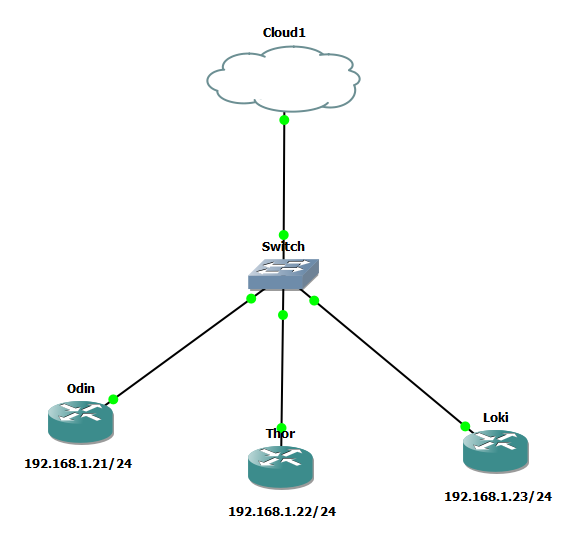
Just a reminder, this is our topology, which is nothing but 3 separated devices that are not aware of each other.
Saving to CSV
Importing library and prep work
As I am sure you are very aware, CSV is a widely known import and export format for spreadsheets and databases. Lucky for us, the library for CSV in Python is super straightforward, so let's dive into it! I will explain how I have implemented this for the very first get_interface_desc(nr) function, as the concept remains pretty much the same (difference being the variables that you define, of course).
First, let's import the library by adding the import csv call at the top of our script. I am sure that's no news to you at this point. I also like to keep files structured, therefore I will create a new constant for the directory called output, which is where I will be saving my CSV's to.
Bonus: I have also added os.makedirs, which essentially ensures that the folder gets created if it doesn't exist, saves us time later down the line in case if you use the same script on a different machine and you forgot to create them, trust me - it happens! Oh by the way, you will have to add import os for this to work, since it's a function used by the OS package.
templates_dir = "./templates"
output_dir = "./output"
config_dir = "./config"

os.makedirs(output_dir, exist_ok=True)
os.makedirs(config_dir, exist_ok=True)
os.makedirs(templates_dir, exist_ok=True)
At a high level, we define the directory and ensure it exists using os.makedirs(). We have a constant with a path to our directory, then we use os.makedirs function which takes two values: the path to the file defined above, followed by a boolean exists_ok=True, which ensures that the file will always be created if the script is run (if it doesn't exist, that is).
CSV class
Now that we have the pre-reqs out of the way, let's dive straight into the function.
def get_interface_desc(nr):

      get_interface = nr.run(
          task=netmiko_send_command,
          command_string="show interface description",
          use_textfsm=True,
          textfsm_template=f"{templates_dir}/show_int_desc.textfsm"
      )

      headers = ["device_name", "interface", "status", "protocol", "description"]

      with open(f"{output_dir}/get_interface_desc.csv", "w", newline="") as f:
          writer = csv.DictWriter(f, fieldnames=headers)
          writer.writeheader()

          for host_name, multi_result in get_interface.items():
              result = multi_result[0].result

              for entry in result:
                  row = {
                      "device_name": host_name,
                      "interface": entry.get("interface"),
                      "status": entry.get("status"),
                      "protocol": entry.get("protocol"),
                      "description": entry.get("description")
                  }
                  writer.writerow(row)
As you can see, the top part, which defines our get_interface which is no different to the script from part 2. Right after the get_interface variable, we create what's called headers. I mean, you can call it whatever you like, in fact, but let's keep the naming relevant to what it is. As you have probably guessed by now, the headers field defines our headers for the CSV spreadsheet, pretty self-explanatory, I'd say.
I suspect you had some experience with Python before, but if not, let me introduce you to what's called a context manager. It is a pattern open with that is designed to handle setup and cleanup automatically (such as opening and closing the file).
with open(f"{output_dir}/get_interface_desc.csv", "w", newline="") as f:
    writer = csv.DictWriter(f, fieldnames=headers)
    writer.writeheader()
At the very least, the context manager takes two arguments: the path and the mode. The path in our case is speciifed as f"{output_dir}/get_interface_desc.csv" and the mode is "w" which means write. Other common attributes are "a" - for append and "r" for read. There is also an additional attribute (not mandatory) called newline. It prevents extra blank lines on some systems and lets the CSV module handle line endings correctly.
Moving on, you can see that we are temporarily saving that file as f it will make sense why below.
writer = csv.DictWriter(f, fieldnames=headers)
We are now onto the term that we have already learned, instantiation. We instantiate the csv.DictWriter function to a writer variable. We are also passing the f, which is the file that we have declared above, followed by fieldnames=headers, which tells the function what the headers are.
Creating rows
for host_name, multi_result in get_interface.items():
    result = multi_result[0].result

    for entry in result:
        row = {
            "device_name": host_name,
            "interface": entry.get("interface"),
            "status": entry.get("status"),
            "protocol": entry.get("protocol"),
            "description": entry.get("description")
        }
        writer.writerow(row)
Now, if you compare this to our original code, we are still looping through our aggregated results, instead of creating the variables and allocating specific values, we define them as we go. The row dictionary will be appended to the CSV automatically every time we loop through a new interface, in this case.
And last but not least, writer.writerow(row) is a function which will create the rows for as, since we are passing the dictionary that we created - it should create the row one by one for each interface.
Output
Here is what the output looks like after I have run the script:
device_name,interface,status,protocol,description
odin,Fa0/0,up,up,
odin,Et1/0,up,up,
odin,Et1/1,admin,down,down
odin,Et1/2,admin,down,down
odin,Et1/3,admin,down,down
odin,Fa2/0,admin,down,down
thor,Fa0/0,up,up,
thor,Et1/0,up,up,
thor,Et1/1,admin,down,down
thor,Et1/2,admin,down,down
thor,Et1/3,admin,down,down
thor,Fa2/0,admin,down,down
thor,Lo0,up,up,"Allfather, ruler of Asgard"
loki,Fa0/0,up,up,
loki,Et1/0,up,up,
loki,Et1/1,admin,down,down
loki,Et1/2,admin,down,down
loki,Et1/3,admin,down,down
loki,Lo0,up,up,"""God of mischief"""
As always, you can either open it with your Excel and manipulate further, filter and whatnot, or you can just simply open it in a text editor like me.
Saving Configurations
Originally, I was hoping to evolve Part 3 into an article about how we can produce LLDP output and convert it into a diagram Pythonically. Needless to say, I have run into limitations very quickly. First of all, the nodes that I am using in the lab are ancient, so LLDP is not supported. Now, that's not an issue since I can always use CDP, right? Yeah - guess what - computer says no. CDP is only recognizing neighbors via FastEthernet0/0, which is what I am using here for the management access. Even if I was going to connect it to another device, I am limited to two devices only. This is why I have decided to show you how to save the config to a file instead.
save_conifig_to_file(nr) function
The extraction process is the same as before - we’re still working on a per-host basis. I’ve already introduced the context manager earlier, so I’ll just walk you through what’s happening in this function.
def save_config_to_file(nr):

    try:
        get_config = nr.run(
                task=netmiko_send_command,
                command_string="show running-config",
                enable=True
            )

        for host_name, multi_result in get_config.items():
            print(f"[{current_time}] Saving running configuration for device: {host_name}")
            result = multi_result[0].result
            with open(f"{config_dir}/{host_name}_{current_time}_running_config.txt", "w") as f:
                f.write(result)
In its simplest form, this function retrieves the running configuration from each device and saves it locally to the designated config directory. But wait, there is something new - current_time. In Python, there is a library called datetime, which should become your friend ASAP. When we are saving configs or any outputs in general, it's good to understand when this occurred so that we have a reference point.
This module really just needs two lines of config in its most basic form (there is more to it, and of course, you can read the documentation if you would like to find out).
from datetime import datetime
current_time = datetime.now().strftime("%Y-%m-%d_%H-%M-%S")
Error handling
Let me introduce you to error handling. At some point, your script will fail. Whether it is an unreachable device, or the creds don't work, or someone tripped over the internet cable at the remote site, and you are the lucky person who happened to run the script at the time (anything can happen...). Without error handling, your script will fail. This being said, let's say you run a script for 100 devices without error handling, you are super proud of yourself and your work, about to sip a coffee b,t then you realize your mug is empty. Knowing that your script is perfect, because you have written it, you confidently leave your desk, and you don't even lock your screen because you want everyone to admire your work. But then shortly after you return and see... nothing. This is exactly why you should have error handling, which will silently move on to the next device in line, rather than just saying Foxtrot Oscar and aborting the script completely.
In order to introduce error handling, it is simpler than you think (well, to start with, that is.)
try:
  EXECUTION

except Exception as e:
    IF FAILS DO THIS INSTEAD
    print(f"[{current_time}] Error occurred while getting interface descriptions: {e}")
You need to 'wrap' your function, in our case, within what's called a try/except block. The indentation is the key here too; it is quite important (otherwise it will fail, but you won't catch that failure, funny.)
If your script will not throw any errors, and I mean any errors, it will execute whatever is within the try block. You can also have multiple try/except blocks nested, so that your error capture is more granular. However, if your code fails, you can easily capture it.
except Exception as e that line is allocating the error (also known as Exception) to a variable called e. You can then display that error by including it in your print function (don't forget the f-string). That being said, I don't think I have touched on the f-string
Obviously, there is much more that you can do, capture specific errors, execute a different function/task to remediate the error, etc. For us, we are good with just knowing a) what failed and b) when it failed, oh and c) why it failed.
Let's take our beloved get_interface_desc function as an example.
try:
        get_interface = nr.run(
            task=netmiko_send_command,
            command_string="show interface description",
            use_textfsm=True,
            textfsm_template=f"{templates_dir}/show_int_desc.textfsm"
        )

        headers = ["device_name", "interface", "status", "protocol", "description"]

        with open(f"{output_dir}/get_interface_desc.csv", "w", newline="") as f:
            writer = csv.DictWriter(f, fieldnames=headers)
            writer.writeheader()

            for host_name, multi_result in get_interface.items():
                result = multi_result[0].result
                print(f"[{current_time}] Processing interface descriptions for device: {host_name}")

                for entry in result:
                    row = {
                        "device_name": host_name,
                        "interface": entry.get("interface"),
                        "status": entry.get("status"),
                        "protocol": entry.get("protocol"),
                        "description": entry.get("description")
                    }
                    writer.writerow(row)

    except Exception as e:
        print(f"[{current_time}] Error occurred while getting interface descriptions: {e}")
I am hoping that you have also noticed my print statement, which will tell me what is happening as the script gets executed. I have added multiple print statements with the current_time stamps, to that I know what happened, in what order and when (well, I actually tell it in what order to do it.. but anyway.)
Putting It All Together
import csv
import json
import os
from nornir import InitNornir
from nornir_netmiko.tasks import netmiko_send_command
from nornir_utils.plugins.functions import print_result
from datetime import datetime

nr = InitNornir(config_file="config.yaml")
templates_dir = "./templates"
output_dir = "./output"
config_dir = "./config"

os.makedirs(output_dir, exist_ok=True)
os.makedirs(config_dir, exist_ok=True)
os.makedirs(templates_dir, exist_ok=True)

current_time = datetime.now().strftime("%Y-%m-%d_%H-%M-%S")

def get_interface_desc(nr):

    try:
        get_interface = nr.run(
            task=netmiko_send_command,
            command_string="show interface description",
            use_textfsm=True,
            textfsm_template=f"{templates_dir}/show_int_desc.textfsm"
        )

        headers = ["device_name", "interface", "status", "protocol", "description"]

        with open(f"{output_dir}/get_interface_desc.csv", "w", newline="") as f:
            writer = csv.DictWriter(f, fieldnames=headers)
            writer.writeheader()

            for host_name, multi_result in get_interface.items():
                result = multi_result[0].result
                print(f"[{current_time}] Processing interface descriptions for device: {host_name}")

                for entry in result:
                    row = {
                        "device_name": host_name,
                        "interface": entry.get("interface"),
                        "status": entry.get("status"),
                        "protocol": entry.get("protocol"),
                        "description": entry.get("description")
                    }
                    writer.writerow(row)

    except Exception as e:
        print(f"[{current_time}] Error occurred while getting interface descriptions: {e}")

def get_device_uptime_and_version(nr):

    try:
        get_version = nr.run(
                task=netmiko_send_command,
                command_string="show version",
                use_textfsm=True,
                textfsm_template=f"{templates_dir}/show_version.textfsm"
            )

        if not get_version:
            print(f"[{current_time}] No version data retrieved for devices.")
            return

        headers = ["device_name", "software_image", "version", "uptime"]

        with open(f"{output_dir}/get_device_uptime_and_version.csv", "w", newline="") as f:
            writer = csv.DictWriter(f, fieldnames=headers)
            writer.writeheader()

            for host_name, multi_result in get_version.items():
                print(f"[{current_time}] Processing version and uptime information for device: {host_name}")
                result = multi_result[0].result

                for entry in result:
                    row = {
                        "device_name": host_name,
                        "software_image": entry.get("software_image"),
                        "version": entry.get("version"),
                        "uptime": entry.get("uptime"),
                    }
                    writer.writerow(row)

    except Exception as e:
        print(f"[{current_time}] Error occurred while getting device uptime and version: {e}")


def get_cdp_neighbors(nr):
    try:
        get_cdp = nr.run(
                task=netmiko_send_command,
                command_string="show cdp neighbors detail",
                use_textfsm=True,
                textfsm_template=f"{templates_dir}/show_cdp_neigbhors_detail.textfsm"
            )
        if not get_cdp:
            print(f"[{current_time}] No CDP neighbor data retrieved for devices.")
            return

        headers = ["device_name", "local_interface", "remote_interface", "neighbor_hostname", "neighbor_ip"]

        with open(f"{output_dir}/get_cdp_neighbors.csv", "w", newline="") as f:
            writer = csv.DictWriter(f, fieldnames=headers)
            writer.writeheader()

            for host_name, multi_result in get_cdp.items():
                print(f"[{current_time}] Processing CDP neighbor data for device: {host_name}")
                result = multi_result[0].result

                for entry in result:
                    row = {
                        "device_name": host_name,
                        "local_interface": entry.get("local_interface"),
                        "remote_interface": entry.get("remote_interface"),
                        "neighbor_hostname": entry.get("neighbor_name"),
                        "neighbor_ip": entry.get("mgmt_address")
                    }
                    writer.writerow(row)

    except Exception as e:
        print(f"[{current_time}]Error occurred while getting CDP neighbors: {e}")

def save_config_to_file(nr):

    try:
        get_config = nr.run(
                task=netmiko_send_command,
                command_string="show running-config",
                enable=True
            )

        if not get_config:
            print(f"[{current_time}] No configuration data retrieved for devices.")
            return

        for host_name, multi_result in get_config.items():
            print(f"[{current_time}] Saving running configuration for device: {host_name}")
            result = multi_result[0].result
            with open(f"{config_dir}/{host_name}_{current_time}_running_config.txt", "w") as f:
                f.write(result)

    except Exception as e:
        print(f"[{current_time}] Error occurred while saving device configurations: {e}")

def get_all():
    for task in [get_interface_desc, get_device_uptime_and_version, get_cdp_neighbors, save_config_to_file]:
        try:
            if task(nr) is not None:
                print(f"[{current_time}] Data for task {task.__name__} has been started successfully.")

            print(f"[{current_time}] Completed task: {task.__name__}")

        except Exception as e:
            print(f"[{current_time}] Error occurred while executing task {task.__name__}: {e}")

if __name__ == "__main__":
    get_all()
Thanks for sticking with me through this series -I hope it’s been helpful so far.
So far, we’ve focused on collecting, parsing, and storing network data. In the next part, we’ll take this a step further and start making actual changes on devices, bringing everything together into a complete automation workflow.
 Szymon Czarnecki