
 Szymon Czarnecki
Following the series of Palo Alto articles, we have now moved on to adding resiliency to our topology. Previously, we only had one upstream provider per site, as per below:
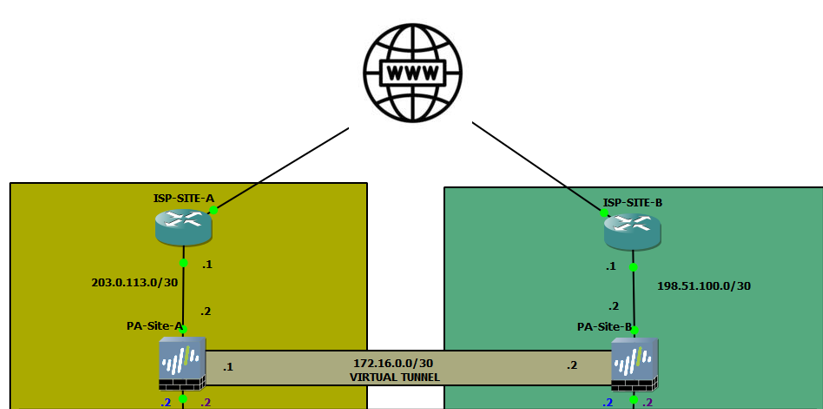
In essence, we have established a BGP adjacency over IPSec tunnel. Each site would have a static default route to the respective ISP, super simple. Now, what happens if we add an additional ISP? Let's assume that both ISPs aren't BGP aware and we can only operate using static routing, as far as the upstream goes at least.
Secondary ISP
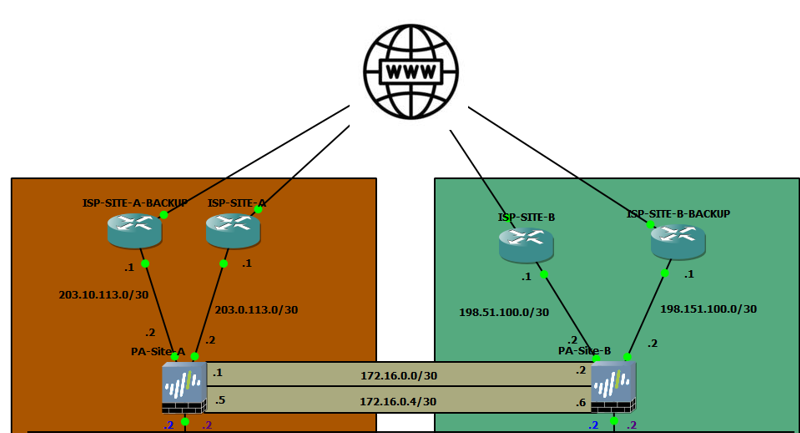
As you can see, considering we have a secondary link on each site, we will utilise this to establish a secondary IPSec tunnel to ensure resilience between the inter-site routing.
Default Route
Assuming the additional ISP does not speak BGP, we have no choice but to rely on static routing for the upstream connectivity. This works, but it introduces limitations. Having two equal-cost default routes - one per ISP - will cause the PA to load balance outbound traffic across both gateways. Without the ISP supporting ECMP on their end, return traffic will arrive back via whichever path the ISP chooses, which may not be the same interface the session originally started on. The PA tracks sessions and expects return traffic on the same interface - if it arrives on the wrong one, the session is dropped
How do we work around this?
Static Routes
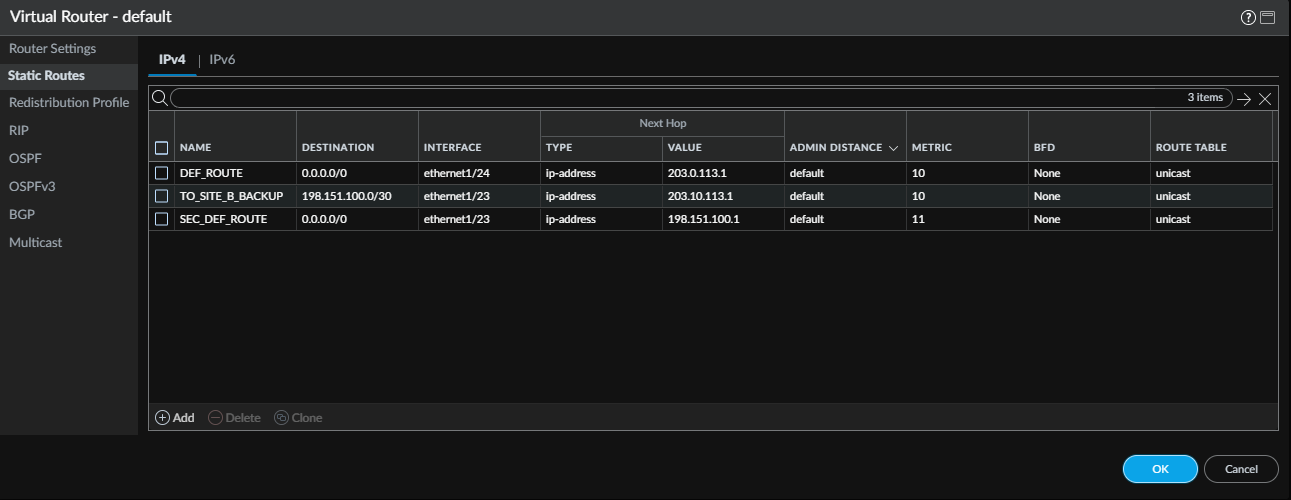
In the screenshot above, we can see that we have 3 static routes. Let me break it down.
- DEF_ROUTE is our original static, default route that points to the primary ISP (ISP-SITE-A). This has a default metric of 10.
- TO_SITE_B_BACKUP is a route to the secondary ISP for Site B. This will allow us to establish the secondary IPSec tunnel. The route points to the secondary ISP (ISP-SITE-A-BACKUP).
- SEC_DEF_ROUTE is a default route which points to the secondary ISP. The difference is the metric, which is higher than the original DEF_ROUTE. This will allow us to prefer the primary ISP.
Now this all sounds great, but there are limitations. The primary route will always remain preferable, as long as the gateway is resolvable. This means that unless the primary link goes down, whether it is a Layer 1 issue or the ISP device is no longer responding, the route will never be flushed from the routing table. As you can imagine. Hypothetically, if there is an issue further up the 'chain' in the ISP network which will prevent us from accessing the internet, we will never failover to the secondary ISP. This is where Path Monitoring comes in clutch.
What is Path Monitoring?
Path Monitoring is nothing new; each vendor these days has a similar mechanism that will allow us to monitor the route. Path Monitor will send ICMP to a destination of our choice over the link that we specify. By default, in Palo Alto, it will send a ping 5 times every 3 seconds. Upon 5 consecutive series of failed pings, the path is considered unusable. We will set up Path Monitoring on our primary default route (DEF_ROUTE).
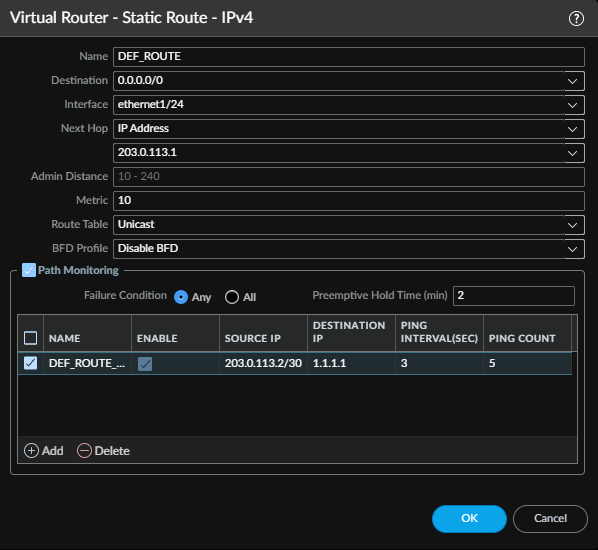
Within the same window where you configure the static route, we need to toggle Path Monitoring and Add the new monitor.
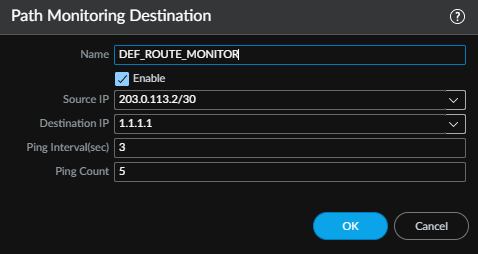
The Source IP will naturally be the IP of the interface that participates in the static route under which we configure the Path Monitoring. In essence, we will ping 1.1.1.1 in our case, 5 times every 3 seconds. Should the 1.1.1.1 stop responding after 15 pings (Ping Interval * Ping Count), the static route will be removed from the routing table.
The health of Path Monitor can be monitored from the CLI by using the show routing path-monitor command.
admin@Site-A-PA> show routing path-monitor

flags: A:active, S:static, E:ecmp

VIRTUAL ROUTER: default (id 1)
  ==========
destination                                 nexthop                                 metric weight flags      interface     pathmonitor   status
0.0.0.0/0                                   203.0.113.1                             10             AS        ethernet1/24  Enabled(Any)  Up
|--> monitored-IP                                interval/count  state
     1.1.1.1                                            3/5      Success


admin@Site-A-PA>
Current status is 'Up', and we can see the interval/count, which tells us which sequence out of the 5 series of pings it is currently on.
Naturally, assuming that the primary link is faulty for whatever reason, the secondary default route SEC_DEF_ROUTE will become our primary, but it will never be in use as long as the DEF_ROUTE is present in our routing table, due to the higher cost.
BGP Failover and Route Preference
As per the new topology, we have established a second IPSec tunnel between the backup ISPs (Backup Site-A to Backup Site-B).
This allows us to ensure that the site-to-site communication remains operational during the failure of any of the ISP links. By default, there are a few limitations that come to mind at first:
- Both routes will be equal (since they both have equal AS paths). This is not really a massive issue since PA will nominate a preferred route. Since both AS paths have the same length and same attributes, it will fall back to the lowest router ID or the lowest neighbour IP. For the sake of this article, let's assume that the secondary link offers much less bandwidth, and we would rather stick to the primary IPSec as our main site-to-site transport.
- The default route reconvergence for BGP takes up to 90 seconds (Keepalive of 30 seconds * 3). This is not super dramatic, but assuming that we are running critical services for our organisation, the less downtime, the better.
BGP Best Path Selection
| Step | Attribute | Preference |
|---|---|---|
| 1 | Next-hop reachability | If only one path exists, select it |
| 2 | Weight | Highest wins |
| 3 | Local Preference | Highest wins |
| 4 | Locally originated | Prefer routes originated by this router |
| 5 | AS Path length | Shortest wins |
| 6 | Origin code | i > e > ? |
| 7 | MED | Lowest wins |
| 8 | Path type | eBGP preferred over iBGP |
| 9 | IGP metric | Lowest metric to next hop wins |
| 10 | BGP Router ID | Lowest wins |
BGP is a beast on its own. It allows us to control route selection in many different ways in many different scenarios. For our use case, considering that we control both sites, we will go ahead with what's called AS Prepend. Based on the table above, the first 4 options are a tie, so we will manipulate the AS Path to prefer BGP routes learned over the initial tunnel that we set up in the previous article.
AS Prepend
Without having to apply any prepends, this is what our LOCAL RIB looks like:
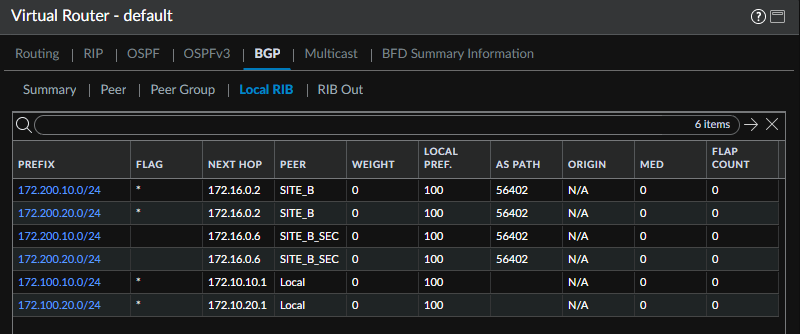
As you can see, the AS Path is equal for all routes learned from both SITE_B and SITE_B_SEC. The asterisk FLAG is tagged against the SITE_B peer, simply because its neighbouring IP is lower, which is the default behaviour for equal routes. Let's apply prepend to the exported routes, so that AS PATH becomes longer for the SITE_B_SEC.
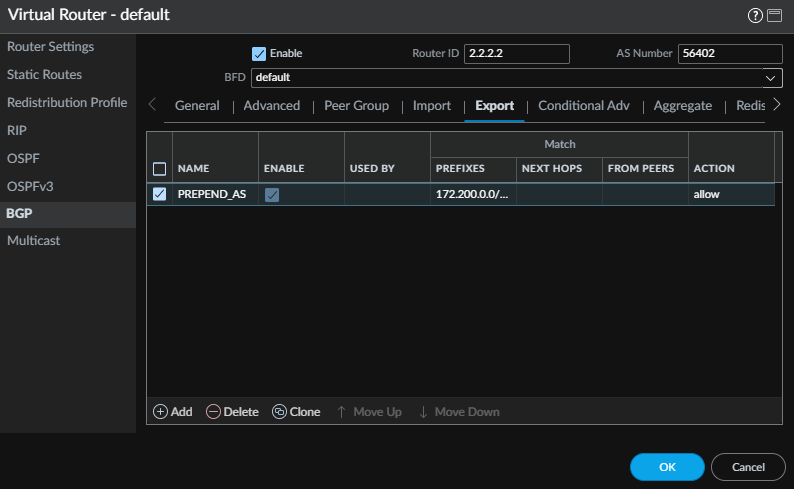
Under BGP > Export, will Add a new Export policy.
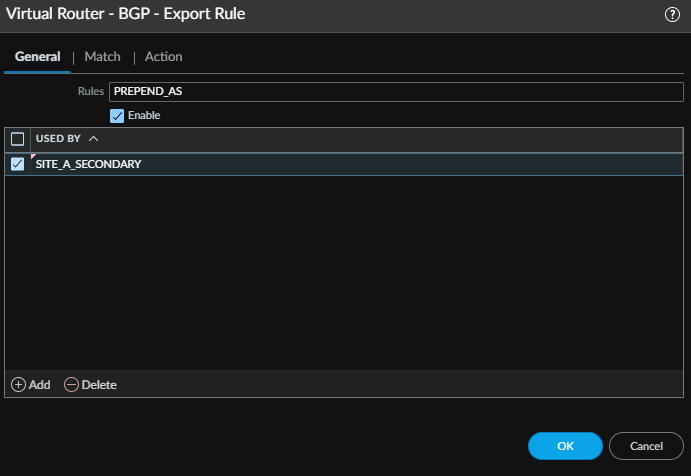
In the General tab, we define which peer group will be using the export policy. I have created one peer group per neighbour for this exact reason.
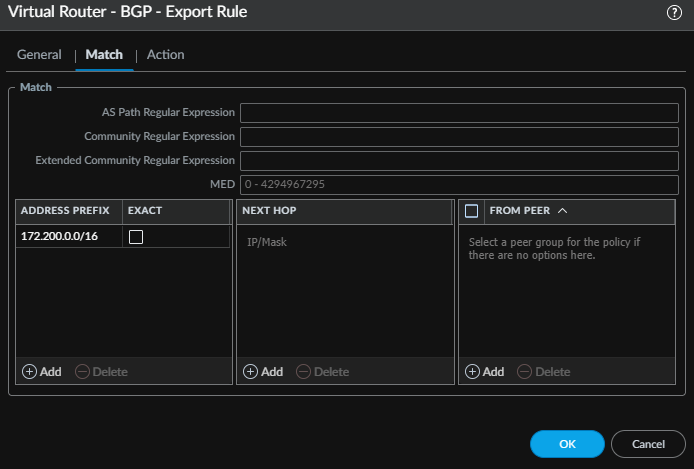
The Match tab defines what routes will be prepended. In our case, we want to capture all local routes (VLAN_10 and VLAN_20), therefore, I have nested both into /16.
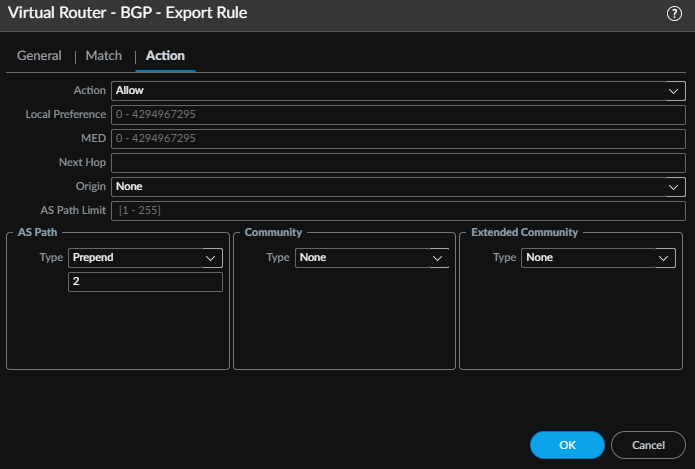
Within the Action tab, under AS Path, we select the type of Prepend and 2. This will prepend (extend) the AS Path by as many times as we specify, in our case, it is 2.
Once committed, let's validate the routing table after the change.
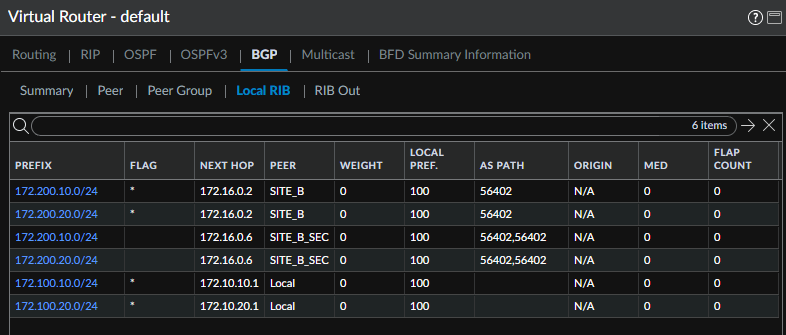
Boom! We are now having secondary routes prepended, which means the SITE_B routes will always be more preferred. But how do we tackle the fast reconvergence?
Bi-directional Forwarding Detection
I tend to use BFD whenever possible. But before I dive into what it is and how it works a bit deeper, let's compare the timers with and without BFD for our BGP sessions:
| Parameter | BGP Default (no BFD) | BFD Default (PAN-OS) |
|---|---|---|
| Hello / Tx Interval | 30s (keepalive) | 1000ms |
| Hold Time | 90s | 0 |
| Detection Multiplier | 3 missed keepalives | 3 |
| Failure Detection Time | Up to 90s | 3000ms (3s) |
| Failure Trigger | Missed keepalives | BFD session down → notifies BGP |
| Silent failure detection | Full hold timer (90s) | 3s regardless |
| Tunable | Yes (min ~3s realistic) | Yes (sub-second possible) |
| Protocol awareness | BGP only | Protocol agnostic |
As I mentioned above, the default BGP Keepalive timer is 3 times Hello / TX Interval. Currently, 'vanilla' BGP adjacency would introduce 90 seconds of downtime for site-to-site traffic, assuming that the primary link goes down. With BFD this would be reduced to 3 seconds by default, or sub-second with tuned timers, depending on the nature of the failure
What is BFD
BFD is a protocol used to detect faults between the two BFD speaking devices. It provides, as explained above, rapid, sub-second failure detection for routing protocols (BGP or OSPF, which can be used for Static routes too). The BFD requires two devices that support the protocol in order to establish an adjacency. It is technically similar to what we used for Path Monitoring; however, in our case, BFD is an open standard protocol defined in RFC 5880 and communicates over UDP 3784 in order to exchange Hellos and determine whether the forwarding path between two devices is still active. Path Monitoring relied solely on ICMP.
How to enable
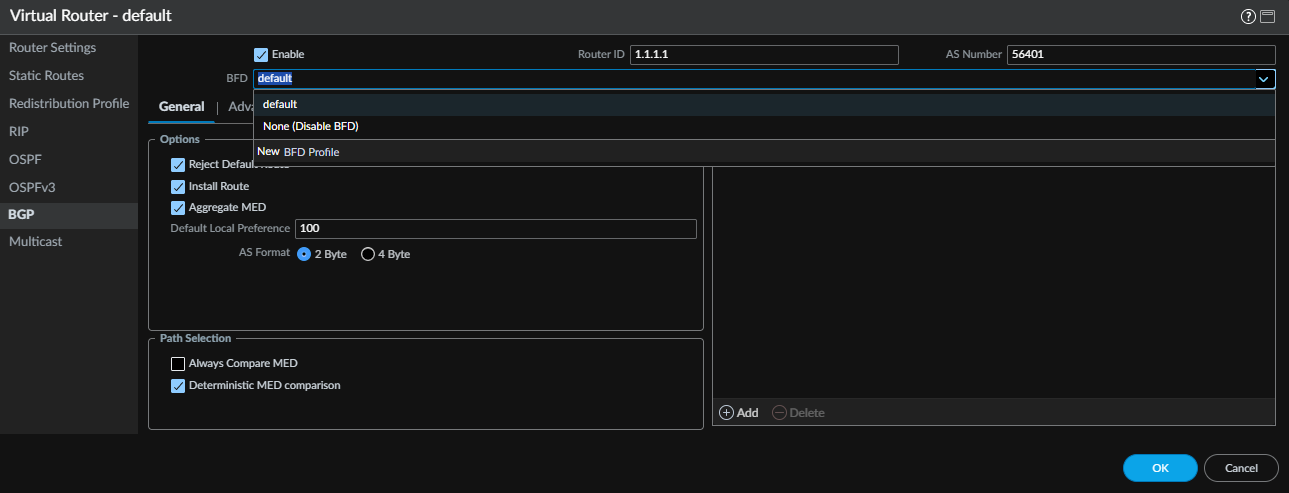
In Palo Alto, enabling BFD is extremely simple. On both PA peers, we enable it under the BGP section. Within the BFD dropdown, we select the 'default' BFD profile. New profiles can be created under NETWORK > Network Profiles > BFD Profile.

Needless to say, a mismatch in timers could cause the BFD session to fail to establish or trigger unnecessary session drops.
Based on the default timers, the Hellos will be exchanged every second. Upon three consecutive failures, the BFD will consider the neighbour as unreachable, and it will mark the BGP neighbour as down, which will automatically flush the routes learned.
Closure
And that wraps up the Palo Alto series. Across three articles, we have gone from building the foundation with VRFs and OSPF, through establishing a site-to-site BGP over IPSec, and finally adding dual ISP resilience with path monitoring and BFD for fast reconvergence. The lab is now in a state where both sites can communicate dynamically, fail over automatically and recover quickly - without any manual intervention.