
Are you trying to host a game server to play with your friends, or have you just started a self-hosted web server that you would like to expose to the internet? Are you stuck behind a CG-NAT, or perhaps (if you are partially lucky) you have been allocated a dynamic IP from your ISP, but this works until it doesn't, right...?
Sure, you could purchase a static IP from your provider, but the price would be around 6-8£ extra per month, which, in my opinion, is not worth it. For just 1£ you can purchase a very basic mini VPS (Virtual Private Server) with an allocated static IP address.
How is that going to make things different, you may ask? Well, purchasing a VSP comes with plenty of benefits. The variety of things that you can do is obviously dictated by the hardware resources that you're paying for, but you could use it as your own VPN Server, host a service of your choice, use it for remote monitoring - well, options are pretty much endless.
Tailscale
Have you ever heard of Tailscale? Tailscale is probably one of my favourite tools that are free (there are premium tiers, but for what you need, it's more than enough!). This amazing piece of software is a Zero Trust identity-based connectivity platform that puts your average, legacy VPN to shame. Tailscale utilises WireGuard protocol to build a 'mesh' of links (or encrypted tunnels rather) between any of your nodes in your tenancy. The free 'Personal plan' allows you to have up to 100 devices (nodes) and 3 users in a single network (called a tailnet).
Tailscale out of the box provides multiple benefits, such as accessing your home lab remotely, connecting different environments effortlessly, controlling your access with ACLs and much more, or even sharing the node of your choice with your friends or family members (or geeky colleagues if you have one).
And how would Tailscale allow you to expose your local machine or even your Windows/Linux client (or Mac if you really want to, but you have nothing to worry about since it probably can't host anything but a landing page...). Well, without any publicly assigned IP address, you cannot really do that, and while Tailscale on this own allocates /32 IP to each node, these are not routable on the Internet.. This is why you need a Virtual Private Server.
What is a Virtual Private Server?
Well, you might have heard this term from one of your geeky friends before (I am probably one of them, to be fair). VPS is a virtualised, isolated server environment hosted on a physical machine. In essence, it uses a virtualisation technology to partition physical servers into an isolated logical virtual environment with dedicated resources. Generally speaking, you 'rent' a virtual server that is a small chunk of resources segmented, or separated from a physical server. There are plenty of tiers of VPS. Let's take Fasthosts as an example (which I recommend):
| Plan | vCPU | RAM | Storage | Price | Discount Price | Notes |
|---|---|---|---|---|---|---|
| VPS Mini | 1 | 1GB | 10GB NVMe | £1/month | — | — |
| VPS 1 | 1 | 2GB | 60GB NVMe | £3/month | £2/month (6 months) | Save 33% |
| VPS 2 | 2 | 4GB | 120GB NVMe | £8/month | £5/month (6 months) | Save 38% |
| VPS 4 | 4 | 8GB | 240GB NVMe | £15/month | £8/month (6 months) | Save 47% |
| VPS 8 | 8 | 16GB | 480GB NVMe | £26/month | £16/month (6 months) | Save 38% |
| VPS 12 | 12 | 24GB | 720GB NVMe | £40/month | £24/month (6 months) | Save 40% |
Good news is that VPS 1 should be more than enough to be used as a an exit-node in Tailscale. What is an exit-node, though, Szymon?
Exit-node
Exit-node, as the name implies, serves a function of a.... exit node. Think of it as a gateway for your VPN. You purchase a package from one of the more common VPN providers, and you select a country in which you wish your traffic to break out from. The exit-node is no different; it automatically tunnels all your traffic via the target node.
Now, my geeky friends, we all know that the internet traffic flows in both direcitons (unless it is my wife telling me to do stuff, then it is very much unidirectional), therefore we need to ensure that the return traffic finds it way back to the source. This is achieved by creating a DNAT (Destination NAT) on the VPS, which would then forward the traffic to the target machine based on the criteria you specify (probably destination port is your best friend).
How can Tailscale and VPS work together to suppress the need to pay for a static IP?
The concept is very simple:
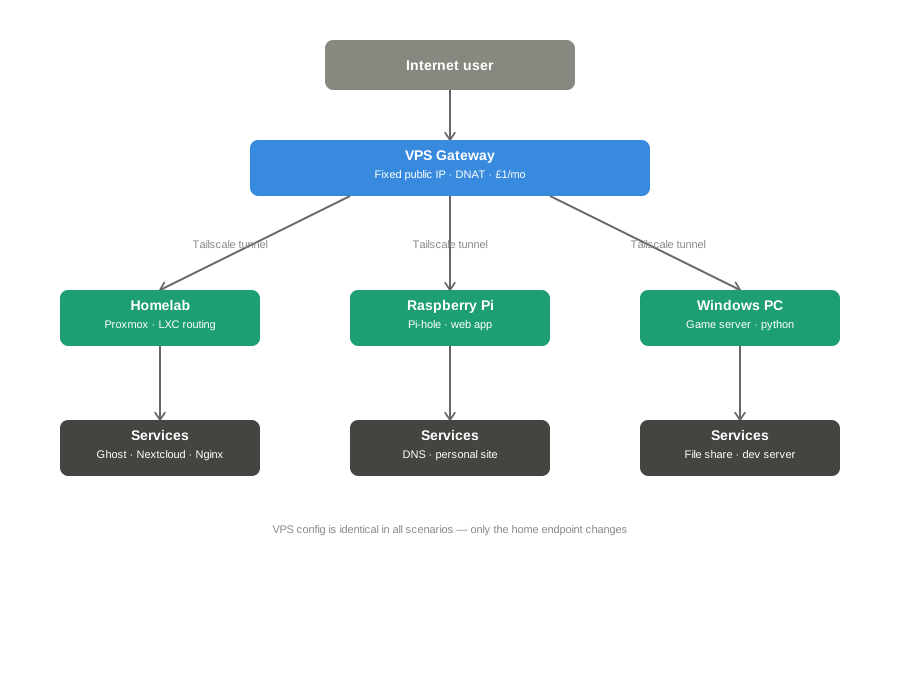
- Your VPS is configured as an exit-node
- Your target machine (i.e the device that you wish to expose) selects the VPS as its exit-node.
- VPS NAT's any traffic destined to the port in question (443 for HTTPS, custom UDP for any game servers, I am sure you know what I mean... right?)
The ways to achieve this may differ on the target machine. If you are hosting a service/server inside of the virtualisation platform of your choice (Proxmox, I am looking at you) - then you don't want to install Tailscale on every single LXC/VM that you need to gain access to. You could, for example, bridge the traffic via a virtual bridge between the target machine and the tailscale node inside of Proxmox, but I think I am deviating now.
The diagram below shows the high-level overview of what I am trying to explain:
And just like that, my friends, you can now call your ISP and kindly tell them to shove their static IP to a black hole VLAN.
This is my very first article on this blog, so please take it with a pinch of salt! In the upcoming article(s), I will show you how to deploy Tailscale, pre-configure VPS and spin up a very basic service that we will then try and access remotely! Happy labbing/networking/coding or whatever you are doing there, friend. Thanks for reading!